
カスタム CSS、JavaScript、HTML
CSS
1.
2.
予約済み CSS 変数を使用する
--g- プレフィックス付きの CSS 変数セットを提供しています。これらの変数はライトモードとダークモードの両方に適切に対応するため、スタイルをより安定して保守しやすくできます。例:メインテキストの色を変更する
予約済み CSS クラス名を使用する
.g- プレフィックス付きの Apidog の予約済みクラス名を使用してください。これらは比較的安定しており、DOM の変更によって壊れにくくなっています。例:左サイドバーを非表示にする
ページ構造とクラス名を確認する
.g- で始まるクラス名を使用することをおすすめします。これらはプラットフォームによって予約されており、構造が比較的安定しているため、機能しなくなりにくいです。その他の構造的なクラス名については、製品アップグレード後にスタイルが機能しなくなることを避けるため、慎重に使用してください。Command + Option + Iまたはfn + F12Ctrl + Shift + Iまたはfn + F12またはF12Cmd/Ctrl + F)を使用してクラス名を特定することもできます。JavaScript
<script> タグや <style> タグをサポートしていません。これらは純粋な JavaScript に変換する必要があります。例:❌ 元のコード(サポートされていません)
✅ 純粋な JavaScript に変換後
I'm using Apidog's "Custom JavaScript" feature, which only allows pure JavaScript (no <script> or <style> tags).

Please convert the following code to pure JavaScript. Here are the requirements:
1. Rewrite the <script> tag to document.createElement('script') dynamic creation method;
2. Inject the <style> content into the newly created style tag and insert the head;
3. Please use standard methods (such as createElement, appendChild) for all DOM operations, and do not use document.write;
4. If the original code uses `window.addEventListener('DOMContentLoaded', ...)` or `window.addEventListener('load', ...)` only to wait for the page before running code, remove the event listener and run the code directly. Apidog executes custom JavaScript after the documentation page has been rendered, so the browser's `load` event may already have passed by that time; code registered inside a `load` listener may not be executed;
5. The final generated JavaScript should be able to run directly in the browser without any explanation.

Original code:
---
(paste your code here)
---
https://xxx.apidog.io/ で始まるものなど)経由でアクセスした場合、カスタム JS は読み込まれず、実行されません。load イベントがすでに発生している可能性があるため、window.addEventListener('load', ...) 内に配置されたコードは実行されない場合があります。ほとんどの場合、代わりにコードを直接実行してください。例:展開/折りたたみ可能なボックス
コードを Apidog の「Custom JavaScript」領域に貼り付けます。
カスタムドメイン経由でドキュメントサイトにアクセスします。
右下にボタンが表示されます。クリックするとチャット iframe が開きます。
iframe.src を AI サービスに置き換えます。例: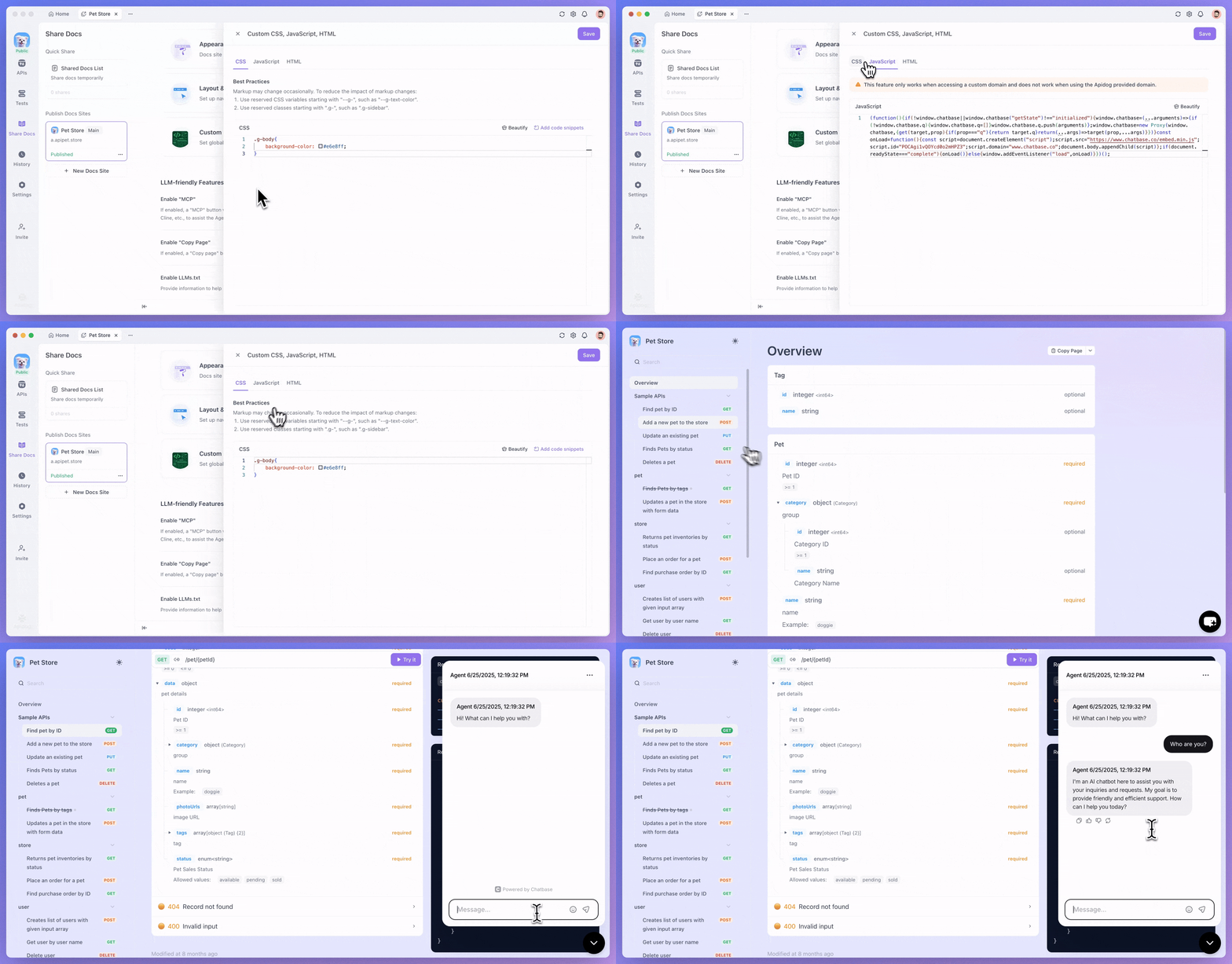
例:Chatbase ウィジェットの埋め込み
Chatbase アプリを作成し、埋め込みコードを取得して、上記のプロンプトを使用して純粋な JS に変換します。
変換後のコードを Apidog の Custom JS セクションに貼り付けます。
カスタムドメイン経由でドキュメントサイトにアクセスします。
右下にボタンが表示されます。クリックするとダイアログウィンドウが開きます。
HTML
FAQ
Modified at 2026-06-11 07:06:02